
PatchGoblin
PatchGoblin Discord Bot
🧌 PatchGoblin – Never miss a patch (or a free game) again
PatchGoblin watches your games and posts patch notes and game updates to your Discord – automatically, cleanly formatted, with version, build and release date. It works for every Steam game – not just a fixed list – plus Fortnite, VALORANT, League of Legends, Overwatch, World of Warcraft and more. On top of that it tells you when full games are free – on PC and mobile – and when a new Humble Bundle drops.
➕ Add PatchGoblin · 💬 Support server · 🌐 Website & dashboard
📰 Patch notes of all games · 🎁 Free games right now · 🛍️ Current Humble Bundles
🗳️ Vote = 24 hours of Premium. Vote for PatchGoblin on top.gg or discordbotlist.com and every server you own with PatchGoblin gets Premium for 24 hours (if it doesn't have Premium already). You can vote on each list every 12 hours – use /vote in Discord to get a reminder.
📰 What a post looks like
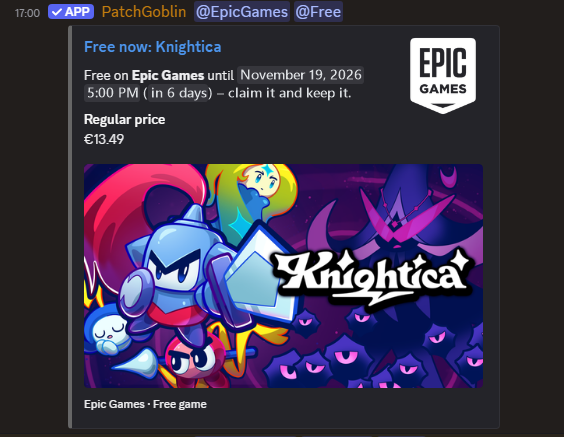
Free games – end date, regular price, Epic incl. mobile
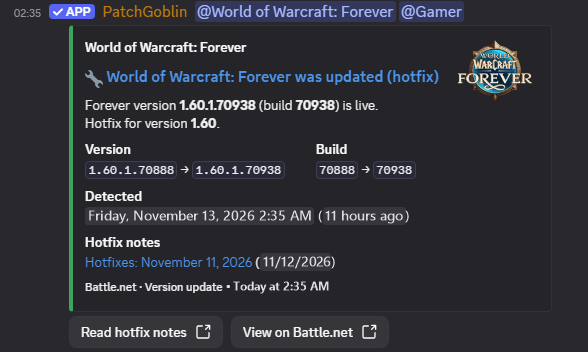
Build alert (Premium) – hotfix detected with version and build
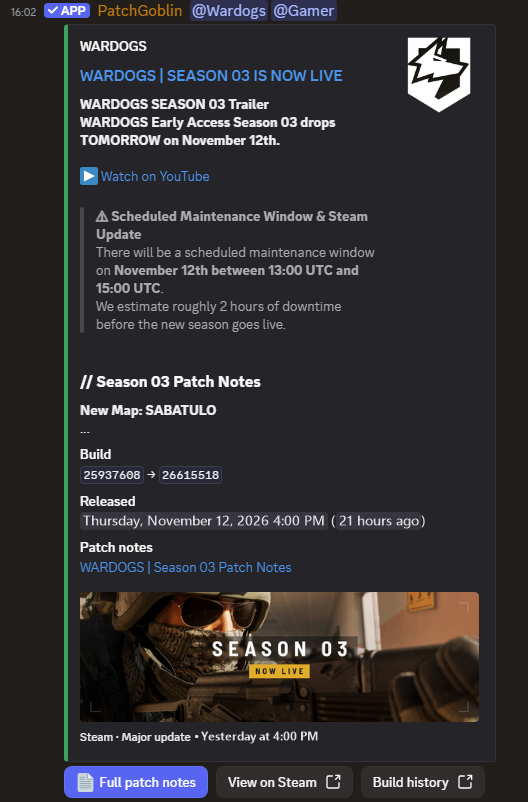
Patch notes – summary, build old → new, full notes by button
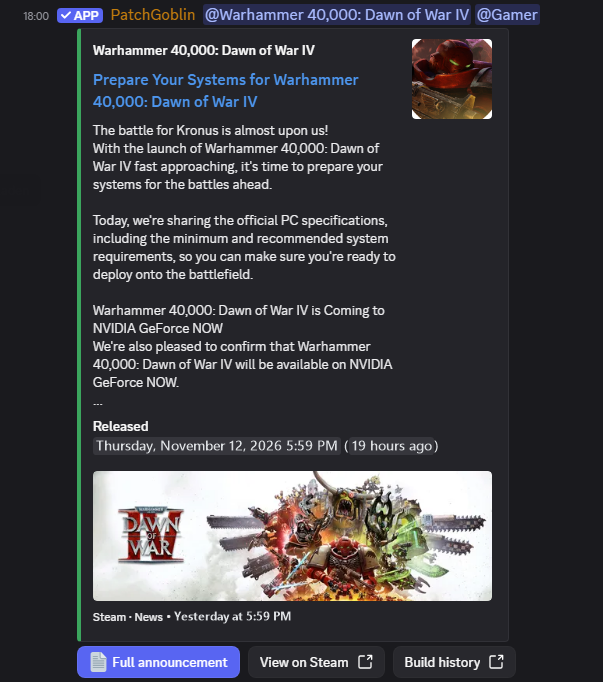
News (Premium) – events, launches and announcements
🎮 Patch notes & game updates
• Every Steam game – patch notes straight from Steam (DLCs map to the main game)
• Beyond Steam: Fortnite, VALORANT, League of Legends, Teamfight Tactics, Overwatch, World of Warcraft, Call of Duty & more
• Build alerts: know when a game updates – even when the developer posts no patch notes (Premium)
• AI tools & drivers: changelogs of ChatGPT, Gemini, Claude, GitHub Copilot, Cursor & more, new NVIDIA / AMD / Intel drivers
• Game missing? /request-game – you get the status by DM
🎁 Free games
• Epic Games Store, Steam, GOG, itch.io and Ubisoft – only real 100 % giveaways, no free-to-play titles or demos
• Mobile: Epic's weekly free games for Android and iOS (iOS EU only) – same game on both = one post with both links
• Epic announcements a week ahead, then again the moment the game is free – your choice: announcement only, "free now" only, or both
• Every post shows until when it's free and the regular price; PC games also show Steam reviews and platforms (Windows / macOS / Linux)
• Subscribe only the stores you care about – with Premium, each store gets its own role to ping (@EpicGames, @Steam, @GOG, @EpicAndroid, @EpiciOS …)
🛍️ Humble Bundles
• Every new paid Humble Bundle – game, software and book bundles, each posted once
• Pick per channel which bundle types you want – default: games only
• Every post lists each price tier with the titles it adds and when the bundle ends
• All running bundles at a glance: patchgoblin.app/humble-bundles
📰 In every post
• Title, cover image and a summary of the patch notes – plus a button for the full notes, paged right in Discord
• Version and build (old → new) and the release time
• With Premium: news (events, shop, tournaments …) and build alerts for updates that ship without patch notes
⚡ How fast? (measured from real delivery times, release at the source → post in your channel)
• All servers: typically 1 min – average 3 min, almost all posts arrive in under 7 min
• Premium: typically 1 min – checked every minute
• Free: typically 6 min – checked every 30 minutes, in the worst case up to 30 minutes
⚙️ Commands
• /patch-sub add – subscribe a game in a channel
• /patch-sub remove · /patch-sub list – manage subscriptions
• /free show · /free add · /free remove – current free games · subscribe a store · unsubscribe
• /bundles add · /bundles remove – subscribe Humble Bundles (games / software / books) · unsubscribe
• /patch – latest post of any Steam game – no subscription needed, only you see it, also in DMs
• /repost – post the latest release of a subscription to its channel – great right after subscribing
• /vote – vote for PatchGoblin – 24 h Premium for your servers, optional reminder
• /patch-sub role-panel – members pick their game roles by button (Premium)
• /nukechat – clear a channel instantly, with confirmation (Premium)
• /premium – Premium status of your server and your purchases
• /invite · /info · /request-game – add the bot · all commands · request a missing game
🖥️ Web dashboard
Everything in your browser, in English or German: subscriptions per channel, free-game stores, roles & groups, keyword filters, permissions, your own bot name, avatar and colors.
🔐 You stay in control
• The bot doesn't read your messages – it only posts in the channels you choose
• Only the server owner decides who may do what
• No ping spam: only the roles you choose are mentioned, never @everyone
💎 Free vs. Premium
✅ Free: all Steam games, Fortnite/Riot/Blizzard, AI tools & drivers · free games (PC + mobile) · Humble Bundles (games, software, books) · full patch notes, version/build/date, /patch, /repost, /free · checked every 30 min (~6 min, max. 30) · 15 titles per server (each free-game store counts as one), from 100 members 30, from 500 members 60, from 2,000 members unlimited
💎 Premium adds: checks every minute (~1 min) · up to 500 titles · news posts · build alerts (updates without patch notes) · role mentions, auto roles, group roles & role panel · one game in several channels · forums & voice channels · keyword filter · custom bot name, avatar & post colors · permissions per command, dashboard access for others, /nukechat
Premium: $2.99/month (subscription, cancel anytime) or one-time packages without subscription: 3 months $7.99 · 6 months $14.99 · 12 months $24.99 – via the Discord shop.
Or for free: vote on top.gg or discordbotlist.com – 24 hours of Premium per vote.
➕ Add PatchGoblin · 💬 Support server · 🌐 patchgoblin.app · Privacy & terms on the website
PatchGoblin is built by a solo developer – feedback, ideas and bug reports are very welcome on the support server.
Reviews
No reviews yet.