

R6Sync
R6Sync Discord Bot
# R6Sync — The Modular R6 Hub Your Server Deserves
Stop juggling roles. Start running a real Rainbow Six community.
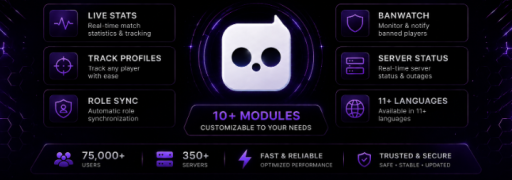
R6Sync turns your Discord into a professional Rainbow Six Siege hub — automatic rank roles, deep configuration, and admin tools that run themselves. You pick every module during setup: lean rank sync only, or the full package with verification, reputation, nicknames, and live server status.
Guided /setup in minutes. Fine-tune anytime with /settings. If something breaks, /repair fixes it — safely, as often as you need.
---
## ⚡ Why server owners choose R6Sync
100% modular — enable only what your community needs; nothing forced
Zero manual roles — ranks, platforms, seasons, and optional badges update on sync
Guided onboarding — /setup walks you through modules, roles, logs, and language step by step
Self-healing config — /repair diagnoses and fixes missing roles, channels, or broken mappings
Scales with you — small rank-sync server or full R6 ecosystem with verification and reputation
Transparent admin control — whitelist, dedicated logs, verification bypass, per-server language
Your members get stats, dashboards, and /sync everywhere R6Sync is installed. You get a server that stays organized without daily micromanagement.
---
## 🧩 Build Your R6Sync — Module by Module
Every feature is an independent module. Toggle on/off in /setup or /settings at any time.
### 👥 Role Modules — automatic Discord roles from real player data
Core Roles (recommended) — Auto-assigns current rank (Copper → Champion) and platform (PC / Console). Removes outdated roles on every sync. The foundation — most servers start here.
Current Season — Cosmetic role for the active ranked season — updates when the season changes.
Max Rank — Highlights members by highest lifetime rank achieved.
Max Rank Season — Role for the season where max rank was reached.
Match Buckets — Groups members by total matches played — tiers created and managed automatically.
Profile Views — Groups members by Stats.cc profile views — dynamic tiers. (Assigned to Premium-linked players only)
Role Auto-Sort — Keeps your role list clean and readable — ranks, platforms, and badges sorted in logical blocks. Optional anti-delete restores header roles if someone removes them.
Bulk sync: run Global Member Sync from settings to refresh every linked member on the server at once (same as /sync, no member cap).
### 🤝 Community Modules — structure and trust
Reputation — Peer + / − feedback with tiers, cooldowns, and optional reputation roles. Reduces toxicity, rewards good teammates. Seasonal reset each quarter.
Verification — Unverified role until a Stats.cc account is linked — gate access, funnel new members through linking before they see the rest of the server.
Nickname Sync — Member nicknames set to their linked R6 username — instant recognition in voice and chat. Progressive renaming respects Discord rate limits.
### 📡 Info Modules — keep your community informed
R6 Server Status — Live embed for PC, PlayStation & Xbox — auth, matchmaking, store. Auto-refreshed every 30 minutes. One less “are servers down?” question in general chat.
---
## 🛠️ Admin Toolkit — Everything in One Place
/setup — First-time wizard — modules, roles, log channels, language
/settings — Full control panel — toggle modules, role mappings, reputation, logs, admin roles
/repair — Diagnostics + auto-fix for roles, channels, mappings (safe to run anytime)
/verif — Enable and configure the verification flow
/bypass — Manually exempt a trusted member from verification
/admin-whitelist — Grant R6Sync admin access to users or roles you trust
Also included out of the box:
Dedicated log channels — errors, admin actions, banwatch alerts
Onboarding channel — auto-created for bot updates and announcements
Optional log routing for link, unlink, and sync events
11 languages — EN, FR, DE, IT, ES, PT, RU, JA, ZH-CN, ZH-TW, TR (server-wide or per-user)
---
## 🔐 Verification & Access Control
Lock down your server until members prove they play:
Unverified role applied automatically to new members
Dedicated verification channel with guided linking flow
/bypass for staff, friends, or edge cases
Verification logs for transparency
Ideal for competitive communities, LFG servers, and any server that wants real players, not lurkers.
---
## 🛡️ Reputation — Healthier Communities, Less Moderation
Give your members a structured way to rate each other — so you spend less time on “he was toxic” disputes:
Standardized positive / negative reasons
Score −100 to +100 with clear tiers and optional auto-assigned roles
Anonymous to the rated player · cooldowns, daily limits, anti-spam built in
Seasonal reset each quarter
Configure tiers and role mappings in /settings — enable or disable the whole system with one toggle.
---
## 📊 What Your Members Get (so you don't have to build it yourself)
R6Sync handles the player-facing side automatically:
/stats & /leaderboard — live Stats.cc data, seasonal breakdowns, server rankings
/dashboard — link account, view profile, one-click sync
/sync — refresh roles on every server where R6Sync is installed
/rep — reputation give / profile / notifications
/watch — personal ban alerts for up to 5 tracked accounts
Members link once; your server's role config applies on every sync. Each server stays independent.
---
## 🔒 Reliability & Anti-Abuse
Built for production servers, not hobby scripts:
Permission checks and role hierarchy validation before any action
Account linking protection — one R6 account per Discord user
Reputation cooldowns, caps, and duplicate prevention
Structured logging for admin transparency
/help interactive guide · /report for support
---
## 🚀 Go Live in Minutes
1. Invite R6Sync
2. Run /setup
3. Pick your modules (start with Core Roles, add more later)
4. /settings to fine-tune mappings and logs
5. Point members to /dashboard to link — roles handle themselves ✅
---
Powered by Stats.cc · Rainbow Six Siege is a trademark of Ubisoft. R6Sync is not affiliated with Ubisoft.*
---
Reviews
No reviews yet.